
Acctivate News
Built For

Streamlined Special Ordering
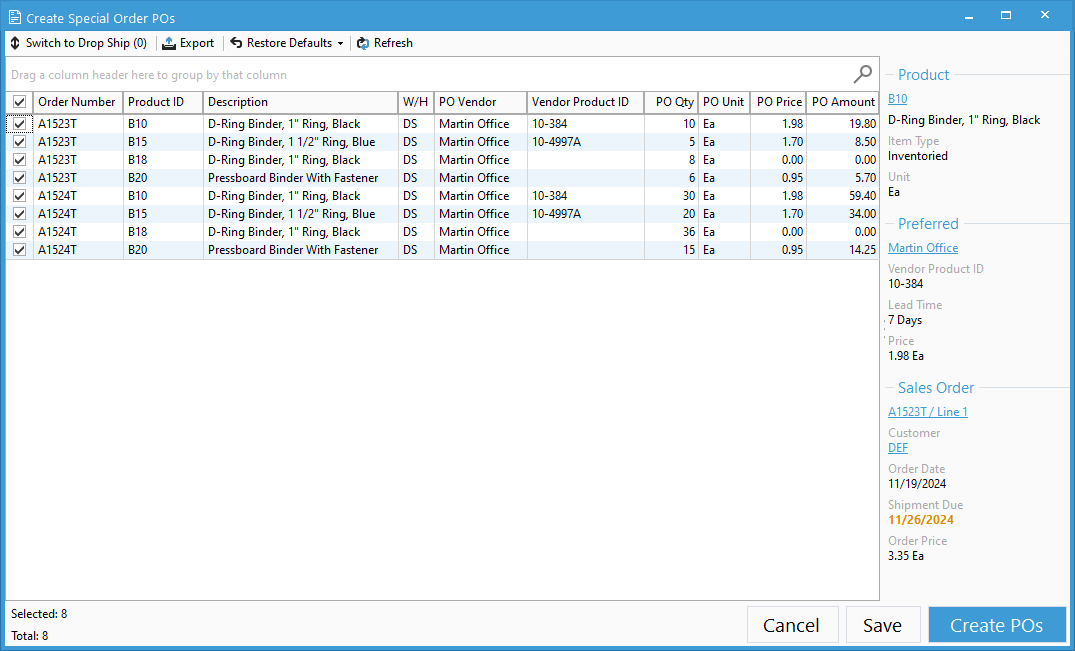
Acctivate’s reimagined Create Special Order window makes it easier than ever to review, edit, and create Special Order Purchase Orders.
Users who have worked with the recently redesigned Create Reorders window will be immediately familiar with the intuitive presentation of information.
Key Improvements
The Create Special Order window includes many benefits over its predecessor, including:
- A single line grid for each Special Order sales order line, making it easy to quickly review the columns
- The ability to search the grid as well as sort and group by fields
- More information about the related sales order, included line number, sales order price, and sales order shipment dates
And as always, you have the ability to purchase from vendors associated with the product, or from new vendors. Once you’ve reviewed the products to order, simply click Create POs to reorder! Don’t forget to check out our improved Create Drop Ship POs window too.
Check out our Create Special Order PO documentation at docs.acctivate.com

Related Posts
-
Version 16 Available!
Acctivate Version 16 is available for download! Be one of the first to get your hands on exciting new features and changes, including:
-
Acctivate Query – Turn Raw Data into Answers You Can Use
Every business runs on data, but not every question you have fits neatly into a pre-built report. Maybe you need last quarter’s invoice totals broken…
-
Expanded Support for QuickBooks Online Custom Fields
Your Custom Fields, Perfectly Synced, Now Without Limits Every business tracks the details that matter most to them, whether that’s a sales rep, a project…
Call us at 817-870-1311