
Acctivate News
Built For

Capture What Matters: Acctivate Now Syncs WooCommerce Custom Sales Order Fields
Your WooCommerce orders carry more than products and prices. Now Acctivate can bring all of it along.
Acctivate’s WooCommerce integration already streamlines sales order entry and automates updates back to your online store, including tracking information and inventory quantities. Now it goes further.
The integration now supports syncing and mapping custom sales order fields in WooCommerce to standard and custom sales order fields in Acctivate.
Why it matters
Gift messages, delivery instructions, PO numbers, customer preferences, and special handling notes often live in custom fields on a WooCommerce order. If that data stays in the store, your team has to hunt for it, re-key it, or miss it entirely.
With custom field sync, the information that is important to your customers and your order fulfillment process is captured automatically. Orders arrive in Acctivate complete, so your team can fulfill them accurately without extra steps.
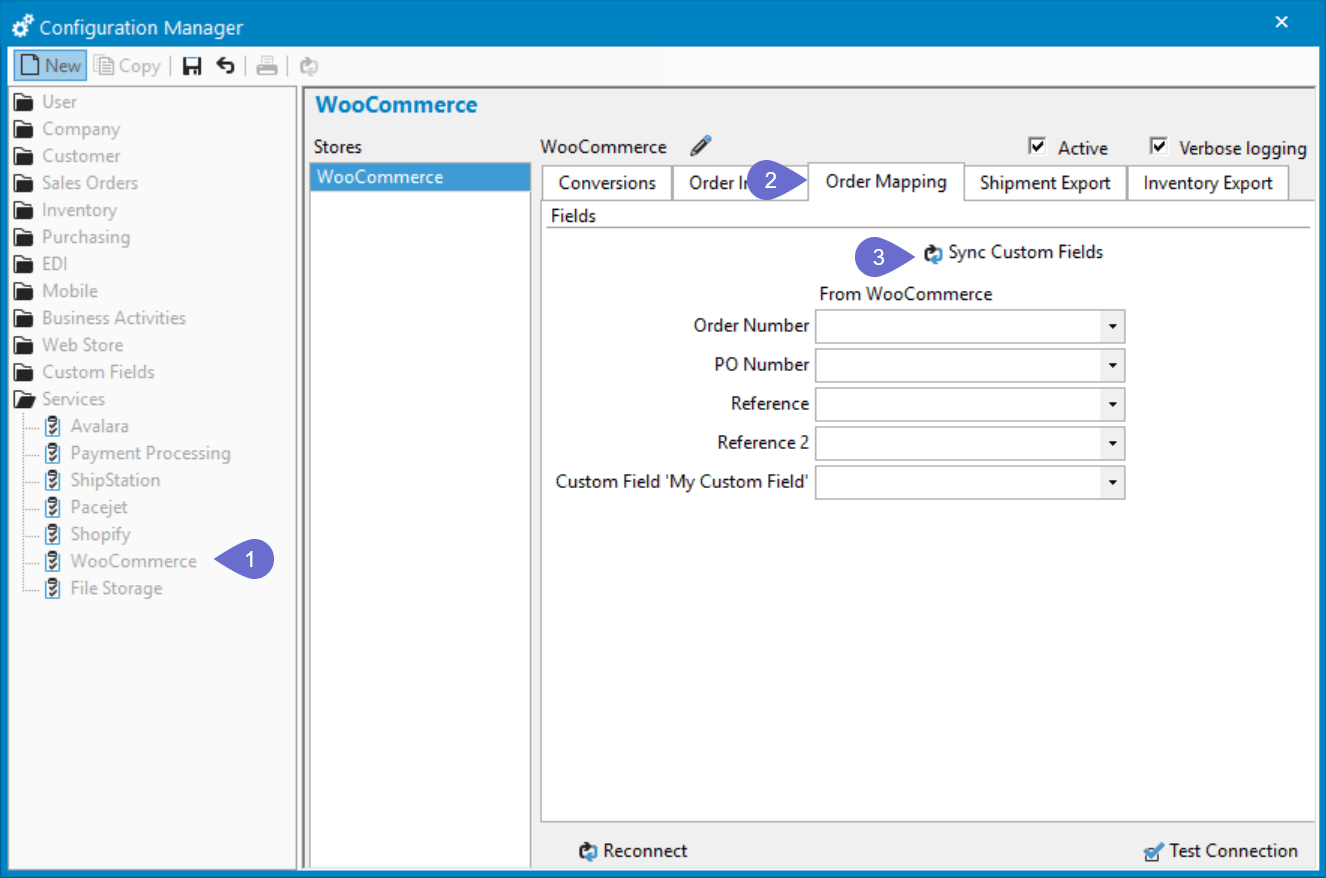
Get started in three steps
- Open the WooCommerce integration in the Configuration Manager.
- Select the Order Mapping tab.
- Click Sync Custom Fields to retrieve a list of your WooCommerce custom fields.
From there, use the dropdowns to map each WooCommerce field, standard or custom, to a standard or custom sales order field in Acctivate. That’s it.

Related Posts
-
Version 16 Available!
Acctivate Version 16 is available for download! Be one of the first to get your hands on exciting new features and changes, including:
-
Acctivate Query – Turn Raw Data into Answers You Can Use
Every business runs on data, but not every question you have fits neatly into a pre-built report. Maybe you need last quarter’s invoice totals broken…
-
Expanded Support for QuickBooks Online Custom Fields
Your Custom Fields, Perfectly Synced, Now Without Limits Every business tracks the details that matter most to them, whether that’s a sales rep, a project…
Call us at 817-870-1311