
Acctivate News
Built For

Acctivate Ideas Portal
We are excited to announce the Acctivate Ideas Portal!
The Ideas Portal is a direct channel between you and our product team. This is your opportunity to shape the future of the Acctivate platform by sharing feedback, submitting feature requests, and voting on ideas that matter most to your organization. We created this portal because we believe the best product decisions come from listening to the people who use Acctivate every day. Your voice matters, and this is how you make it heard.
A Note on How Ideas Are Reviewed
Submitting an idea is the first step in an ongoing conversation. Our product team reviews every idea submitted through this portal, and votes and comments from customers like you directly inform our prioritization process.
Please keep in mind that while all ideas are reviewed, not every idea will be developed. Roadmap decisions are shaped by a range of factors — including strategic alignment, technical feasibility, customer impact, and resource availability. Submitting an idea does not constitute a commitment or guarantee of development. Ideas that gain strong community support and align with our product direction are most likely to move forward.
We are committed to transparency: you will always be able to see the status of your ideas and understand where they stand in our review process.
1. Submit a New Idea
- Navigate to acctivate.ideas.aha.io to access the portal, then click + Add a new idea at the top of the left sidebar.
- Type a one-sentence summary of your idea. The portal automatically checks for similar existing ideas — if one already matches, vote for it instead of creating a duplicate.
- Select an Idea Type: New Feature, Enhancement, Bug, or Process-related.
- Add more detail: explain why it is useful, who would benefit, and how it should work. Attach a screenshot or file if it helps explain the request.
- Click Add idea to submit. Your idea is now live on the portal for others to vote on and for our product team to review.
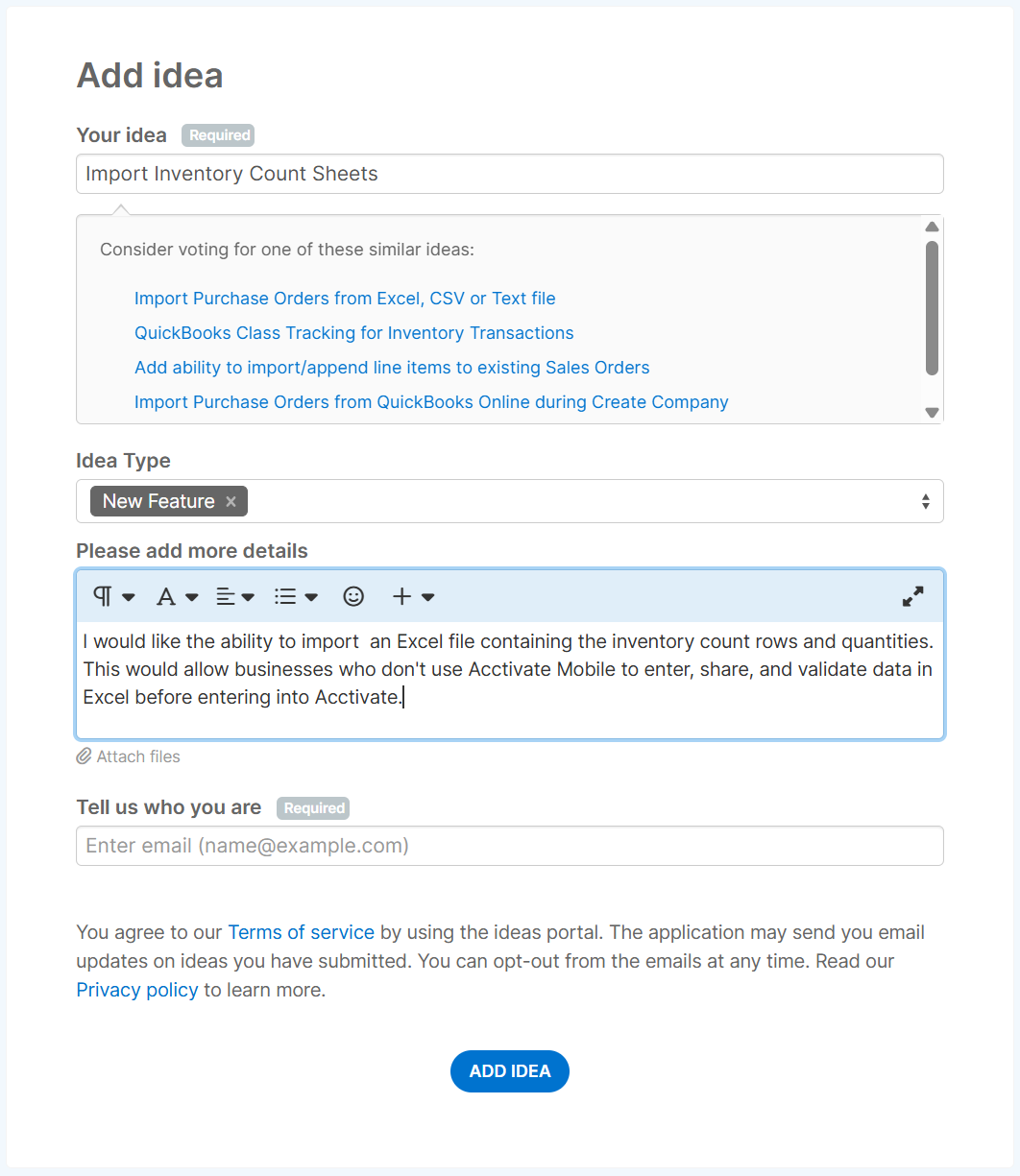
| Already been suggested? As soon as you start typing your idea’s summary, the portal searches for similar existing ideas and lists any matches right below the field. If one of them describes the same problem, open it and add your vote and a comment instead of submitting a new one — that keeps related feedback together in one place and gives the existing idea a stronger case for our product team, rather than splitting support across duplicates. |
2. Vote and Comment on Existing Ideas
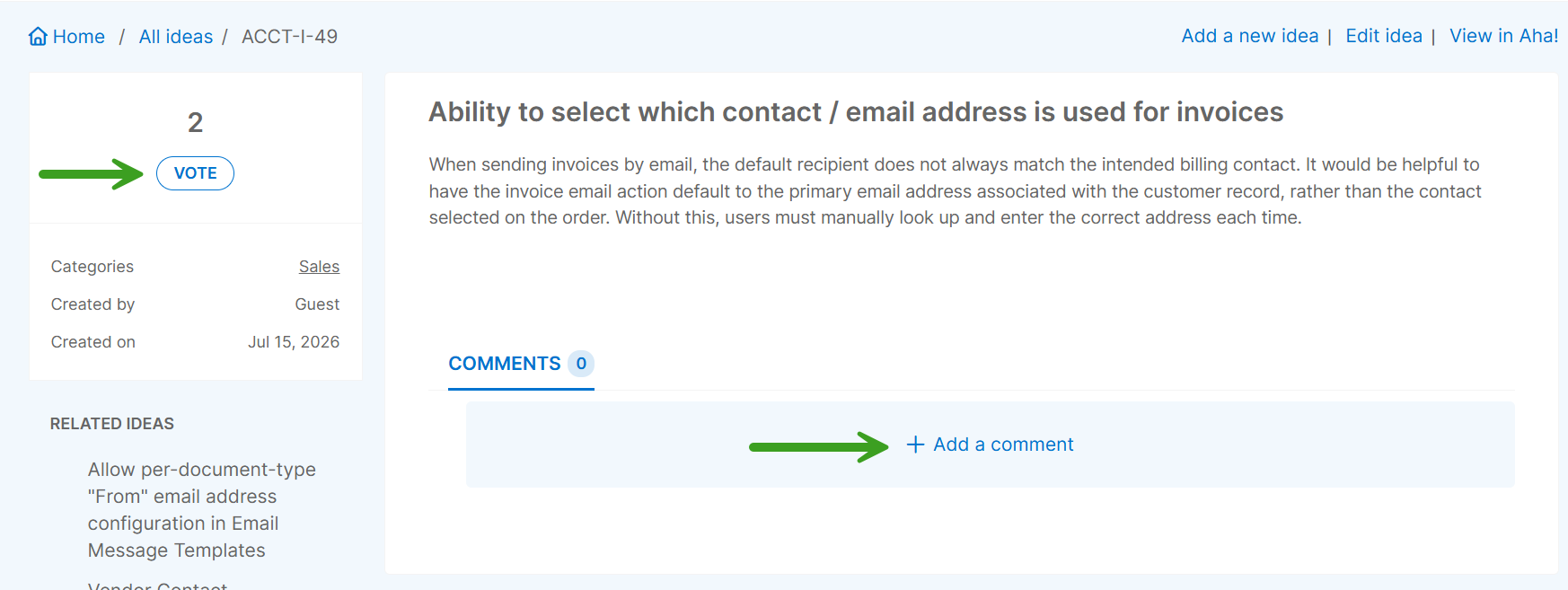
Before submitting a new idea, browse All ideas or use the search bar to see if someone has already suggested it. If you find a matching idea, click VOTE to add your support — the more votes an idea receives, the more visibility it has with our product team. Open any idea to leave a comment with additional context.
3. Track the Status of Your Ideas
Use the left sidebar to keep tabs on your activity: My ideas lists everything you have submitted, and My votes lists every idea you have backed. Each idea carries a status set by our product team:
| Status | What it means |
| In review | Our product team is evaluating the idea. |
| Planned | Accepted and scheduled for a future release. |
| In progress | Actively being built. |
| Shipped | Released. Use the status filter to view shipped ideas. |
| Already exists | The requested capability is already available. |
| Will not implement | Reviewed, but not planned at this time. |
4. Tips for a Strong Idea Submission
- Submit one idea per request. Bundling several requests into a single idea makes it harder for others to find, vote on, and track, and harder for our team to evaluate.
- Describe the problem, not just the feature. Telling us what you are trying to accomplish and why it matters helps our product team design the right solution.
- Add specifics. Screenshots, example data, or a short description of your current workaround all help our team understand the real-world impact.
- Search before you submit. A quick check of All ideas avoids duplicates and lets you add your vote to a request that is already gaining traction.
Thank you for being a valued member of the Acctivate customer community. Your participation in this portal is genuinely appreciated, and we look forward to building a better product together.
| Confidentiality & Safe Harbor Statement Acctivate shares this portal with our customers to enable meaningful dialogue about product direction and to ensure that the voices of our users are reflected in our roadmap. By accepting access, you agree to treat all information encountered in this portal — including unreleased product ideas, roadmap direction, and the ideas of other customers — as confidential and proprietary to Acctivate. Important notes: It reflects our current thinking. Our product roadmap is intentionally fluid. Ideas, features, and timelines may be added, deferred, reshaped, or removed as we learn from customers and as the market and technology evolve. It is directional, not contractual. Ideas submitted to or visible in this portal do not represent commitments, guarantees, or binding obligations of any kind. No statement within this portal constitutes a contractual commitment or guarantee of future availability. For purchasing decisions, rely on what is generally available today. Decisions to purchase or commit to Acctivate products should be based on functionality that is currently generally available. Specific commitments, where they exist, are set out in your written agreement with Acctivate. |

Related Posts
-
Version 16 Available!
Acctivate Version 16 is available for download! Be one of the first to get your hands on exciting new features and changes, including:
-
Acctivate Query – Turn Raw Data into Answers You Can Use
Every business runs on data, but not every question you have fits neatly into a pre-built report. Maybe you need last quarter’s invoice totals broken…
-
Expanded Support for QuickBooks Online Custom Fields
Your Custom Fields, Perfectly Synced, Now Without Limits Every business tracks the details that matter most to them, whether that’s a sales rep, a project…
Call us at 817-870-1311