
Acctivate News
Built For

Salesperson Creation in QuickBooks Online Companies
Companies integrated with QuickBooks Online can now create salespersons directly within Acctivate.
Previously, Acctivate synced the employee list from QuickBooks Online and used it as the salesperson list. However, salesperson roles and their relationships with your business can be more complex. For example, your sales team might include inside sales, outside sales, or even referral services.
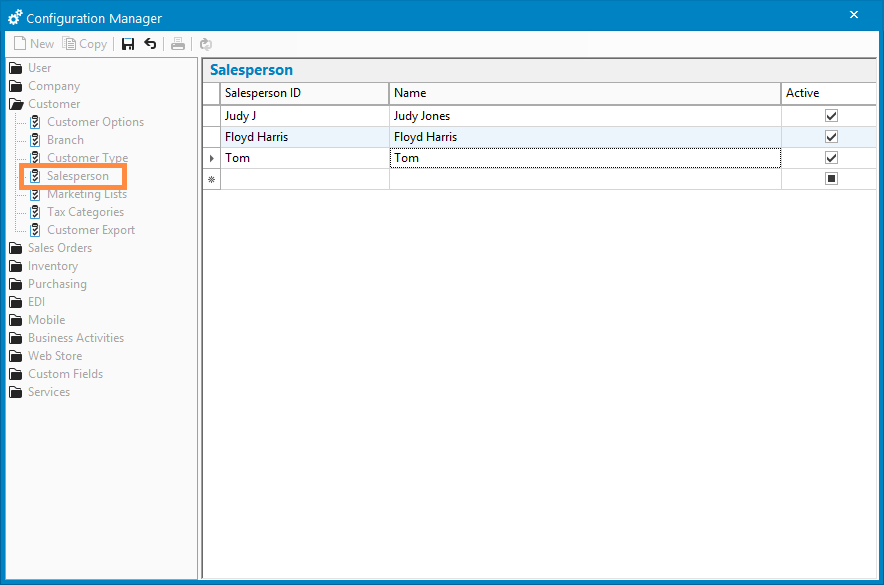
With Acctivate version 14 SP1, you can now create the salesperson list by navigating to the Salesperson section of the Configuration Manager and manually enter a Salesperson ID and Name.
Salespersons in Acctivate vs QuickBooks Online
Acctivate includes features and functionality designed to extend and complement QuickBooks Online.
While QuickBooks Online supports custom fields to track salespersons on invoices, Acctivate provides a more robust and integrated experience, giving you greater control over how you track and report sales by salesperson.
Acctivate’s salesperson features include:
- Assigning salespersons to users and controlling access based on the assigned salesperson
- Assigning salespersons to customers and invoices
- Mapping income and COGS accounts by salesperson
- Mapping QuickBooks Classes to salespersons
- Generating various salesperson-oriented reports

Related Posts
-
Version 16 Available!
Acctivate Version 16 is available for download! Be one of the first to get your hands on exciting new features and changes, including:
-
Acctivate Query – Turn Raw Data into Answers You Can Use
Every business runs on data, but not every question you have fits neatly into a pre-built report. Maybe you need last quarter’s invoice totals broken…
-
Expanded Support for QuickBooks Online Custom Fields
Your Custom Fields, Perfectly Synced, Now Without Limits Every business tracks the details that matter most to them, whether that’s a sales rep, a project…
Call us at 817-870-1311