
Acctivate News
Built For

Move Database Attachments to OneDrive / SharePoint
COMING IN VERSION 15
We’re excited to announce another enhancement to our Microsoft 365 OneDrive and SharePoint integration.
Since its release, it has enabled businesses to attach files to records in Acctivate while securely storing those files in the cloud—freeing up valuable database space. Once enabled, all new file attachments are automatically saved to the linked OneDrive or SharePoint folder instead of being stored in the Acctivate database.
What’s changed?
Previously, only new file attachments were stored in the linked OneDrive or SharePoint folder. Existing attachments—such as emailed PDF files or files attached to notes—remained in the Acctivate database.
Now, we’ve expanded the integration to sync existing file attachments to the cloud and automatically remove them from the database. This helps reduce overall database size—especially important for customers using SQL Express, which has strict size limits—allowing businesses to avoid hitting maximum capacity and potentially needing a costly upgrade.
Getting Started
To move existing file attachments out of the database, complete the following steps:
- Upgrade to Acctivate Version 15.
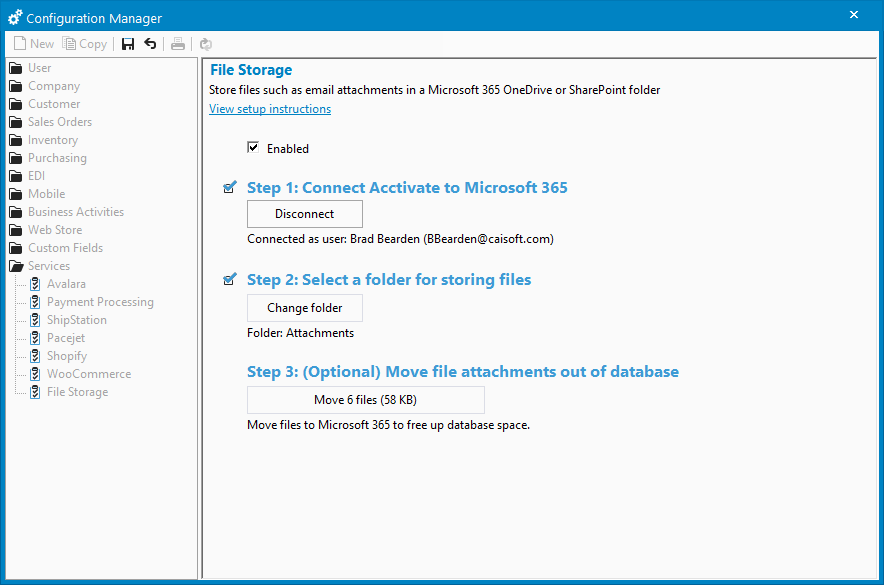
- Navigate to File → Configuration Management → Services → File Storage.
- If not already connected, follow the on screen steps to connect Acctivate to Microsoft 365. If already connected, move onto the next step.
- Click the button under Step 3: (Optional) Move file attachments out of database.
That’s it! The migration will begin and a progress bar will display the status.
You can click Cancel at any time to stop the process. Files that have already been moved will remain in OneDrive. The process can be resumed at any time.
Learn more about integrating Acctivate with Microsoft 365 for file storage.

Related Posts
-
Version 15 Now Available!
Acctivate Version 15 is available for download as a Preview! Be one of the first to get your hands on exciting new features and changes,…
-
Automated Sales Tax with QuickBooks Online
COMING IN VERSION 15 We’re excited to introduce a powerful new enhancement to Acctivate — our QuickBooks Online Automated Sales Tax (AST) integration. This new…
-
New Streamlined Edit Customer window
COMING IN VERSION 15 Acctivate’s redesigned Edit Customer window delivers a streamlined interface for creating and managing customer information. By removing read-only data — which…
Call us at 817-870-1311