
Acctivate News
Built For

Automated Sales Tax with QuickBooks Online
COMING IN VERSION 15
We’re excited to introduce a powerful new enhancement to Acctivate — our QuickBooks Online Automated Sales Tax (AST) integration.
This new integration simplifies and automates the way sales tax is calculated and managed between Acctivate and QuickBooks Online. By connecting the two systems, businesses can ensure sales tax is calculated accurately on transactions without manual intervention, reducing errors and saving time.
Once enabled, users can expect consistent tax handling across Acctivate and QuickBooks Online, helping maintain compliance without additional data entry.
Getting Started
Integrating with the QuickBooks Online Automated Sales Tax features requires authorizing access to Intuit’s new Sales Tax API. This process is easy and can be accomplished by the QuickBooks Online administrator in a few simple steps.
- Have all users log out of Acctivate.
- Use the Window search bar to locate and open Acctivate Database Maintenance.
- In Acctivate Database Maintenance, use the Database menu to select Database Info.
- Click on your Acctivate company linked to QuickBooks Online, then click Disconnect. Confirm you want to disconnect when prompted.
- The Disconnect button will change to Connect to QuickBooks. Click the button to go through the reconnection process. Sign in with QuickBooks Online Company Admin account.
- Once completed, log back into Acctivate and run a sync.
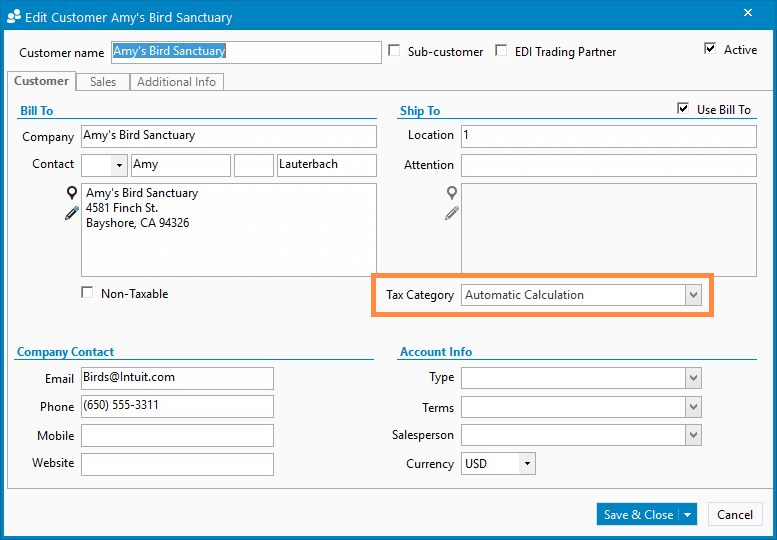
The Automated Calculation tax rate can be assigned to a customer’s ship to location. When a sales order is created for this location, tax will be automatically calculated by QuickBooks. 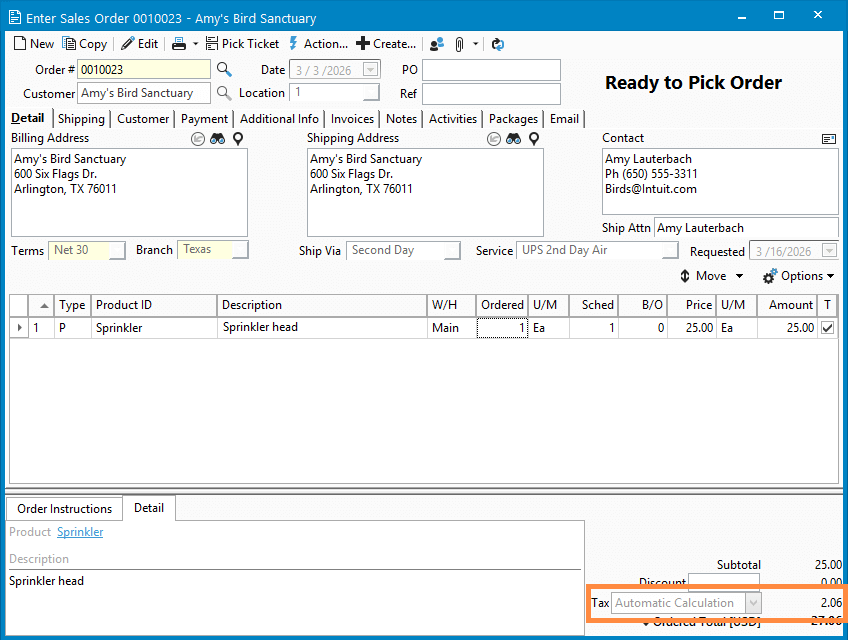
When the Automated Sales Tax calculation is used on a sales order, tax will be automatically calculated by QuickBooks.

Related Posts
-
New Streamlined Edit Customer window
COMING IN VERSION 15 Acctivate’s redesigned Edit Customer window delivers a streamlined interface for creating and managing customer information. By removing read-only data — which…
-
Move Database Attachments to OneDrive / SharePoint
COMING IN VERSION 15 We’re excited to announce another enhancement to our Microsoft 365 OneDrive and SharePoint integration. Since its release, it has enabled businesses…
-
ShipStation, Shopify, and WooCommerce improvements
Version 14 Service Pack 3 delivers new configuration options and improvements to Acctivate’s ShipStation, Shopify and WooCommerce web store integrations. ShipStation, Shopify, and WooCommerce Web…
Call us at 817-870-1311