
Acctivate News
Built For

A Better Way To Manage Reports
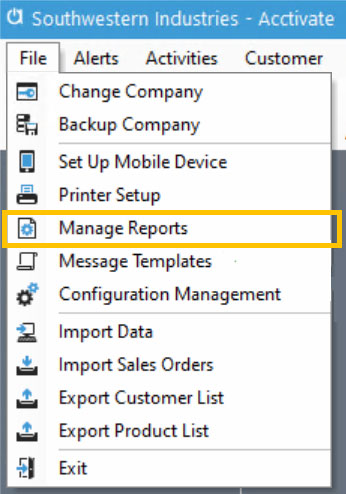
The Report Catalog configuration window has been moved out of the Configuration Manager and is now accessible from the File menu by selecting the Manage Reports menu item. Users with Manage Reports permissions can set up and configure reports without needing access to other system configuration options.
In 12.1, custom reports will be stored in the Acctivate database. This means that custom reports are now included in database backups, ensuring your custom reports are protected from loss.

Related Posts
-
Version 16 Available!
Acctivate Version 16 is available for download! Be one of the first to get your hands on exciting new features and changes, including:
-
Acctivate Query – Turn Raw Data into Answers You Can Use
Every business runs on data, but not every question you have fits neatly into a pre-built report. Maybe you need last quarter’s invoice totals broken…
-
Expanded Support for QuickBooks Online Custom Fields
Your Custom Fields, Perfectly Synced, Now Without Limits Every business tracks the details that matter most to them, whether that’s a sales rep, a project…
Call us at 817-870-1311